 Memory Tickets
Travel journals
Travel journal apps compared: which one fits you
Apple Journal, Day One, Polarsteps, FindPenguins, Journi or one photo a day: what each travel journal app does well, and who it isn't for.

Search for a travel journal app and you get lists that treat very different apps as if they did the same job. Some want you to write. Some record your route on a map. Some turn your photos into a printed book. And some keep only one small thing from each day. If a travel journal of yours has ever stopped on day three, the kind of app was probably the problem, not the brand.
This guide sorts them by what you end up with. One of the apps, Memory Tickets, is ours, and it gets the same "not for you if" as the rest. Everything about the others comes from their official websites, checked in September 2026. Features and prices change, so look again before you pay.
First, decide what you want to keep
Picture the trip five years from now. What would you like to open?
- Pages you wrote, with photos between them: a journal app.
- A map of the route, with photos where they were taken: a trip tracker.
- A book on the shelf: a photo book service.
- One picture and one line per day: a one-photo-a-day app.
Then be honest about time. A detailed journal abandoned on day three leaves you with less than a small habit kept for the whole trip.
If you like to write: journal apps
Apple Journal
On an iPhone, try Apple's own Journal app first. It's free on the App Store and needs iOS 17.2 or later. An entry can hold photos, music, drawings, audio recordings and your state of mind, and when you don't know what to write, it offers journaling suggestions and reflection prompts. It locks with Face ID, Touch ID or your passcode. Apple's guide to getting started with Journal covers the setup.
Not for you if you use Android.
Day One
Day One calls itself "your journal for life": a general journal rather than a travel app, good if you want trips and ordinary days in one place. It runs on iPhone, Android, iPad, Mac and Apple Watch and in a browser, can tag entries with a location and show them on a map, and offers end-to-end encryption and PDF export.
Check the plans before a photo-heavy trip. The free Basic plan allows one photo per entry and one device; more photos, audio recordings and unlimited devices are in the paid Silver and Gold plans.
Not for you if writing every evening would feel like homework on vacation.
If you want the route: trip trackers

Polarsteps
Polarsteps is built around your route. Its tracker records where you go automatically, even offline, and you add photos, videos and short stories to each place. Family and friends can follow along live, you decide who sees the trip, and afterwards you can turn it into a printed Travel Book. Planning, tracking, sharing and reliving trips are free; an optional Plus subscription adds extras such as 3D maps. Polarsteps explains how its travel tracker works.
FindPenguins
FindPenguins does a similar job and calls planning, tracking and sharing "entirely free". Its tracker works offline and detects flights, it can turn your route into a 3D flyover video, and you can order a photo book with your stories, maps and photos. Both apps are on iPhone and Android.
Not for either if you'd rather not run location tracking on vacation, or the trip is a weekend in one city. And a route on its own is the outline of a trip, not the memory of it: both are only as good as the photos and notes you add.
If you want it on paper: photo books
Journi
Journi's website today is about print: photo books, prints and calendars you put together on your phone, tablet or computer. It lays your photos out in a timeline automatically, and its travel photo book can add maps of the trip and your own captions. It isn't a journal you keep during the trip but the place the trip ends up, and you pay per book or print. Polarsteps, FindPenguins and Day One print books too, so check the app you already use first.
Not for you if you want to record the trip while it's happening.
If you want one photo and one line a day
Memory Tickets (ours)
Memory Tickets keeps less on purpose. From each day you pick one photo, give it a title, a place and a date, and write one line about why the day was worth keeping. It comes out as a keepsake ticket, printed on paper with a barcode and a serial number of its own, and the tickets collect by month. A ten-day trip becomes ten tickets. The same habit works at home too; our guide to one photo a day covers how to keep it going.
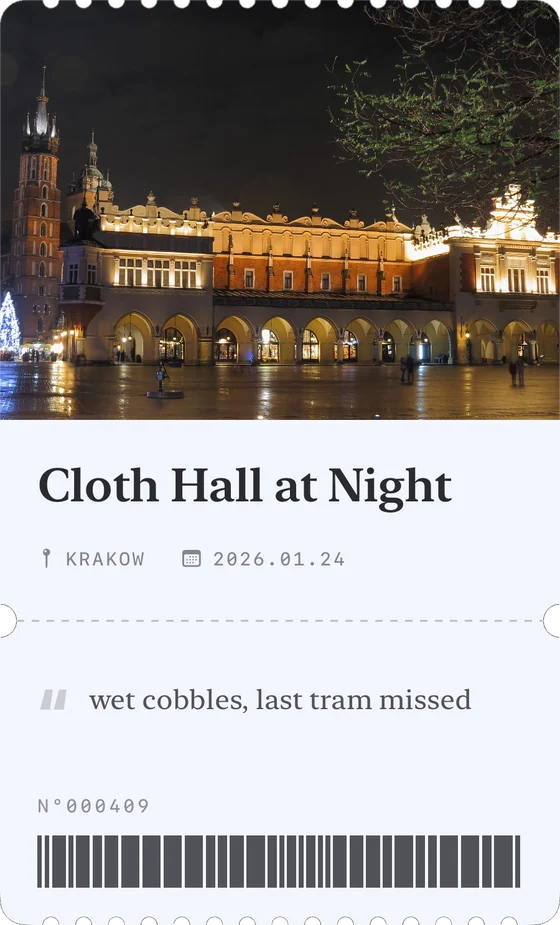
The whole entry on the ticket above is "wet cobbles, last tram missed".
There's no account, no server and no analytics: tickets and photos stay on your phone. It's free with a banner ad. Pro removes the ads, lets a ticket carry six photos instead of one, and unlocks more papers, accent colors, typefaces and stamp styles.
Not for you if you want to write pages (it's built around a single line), want a map or route tracking, want family to follow the trip live, or use Android: it's on iPhone only.
Three checks before you commit
- Where does the journal live? Only on your phone, or on the company's servers too, so you can open it on a laptop and share it? Both are reasonable. Know which one you're choosing.
- Can you get your entries out? Find the export option before you put years into one app.
- Try it at home first. If one entry annoys you on an ordinary Tuesday, it will annoy you more on day six of a trip.
The short version
- To write: Apple Journal on iPhone, or Day One on almost any device.
- For the route, shared with family and friends: Polarsteps or FindPenguins.
- For a book on the shelf: Journi, or the print option of the app you already use.
- For a small habit that lasts the whole trip: one photo and one line a day, in Memory Tickets or simply in the captions of your phone's photo library. Our guide to what to do with your travel photos shows how.
Nothing says it has to be one app, either. A tracker for the route and a small daily habit for the days work well together, as long as the daily part stays small enough for the tired evenings.